How to Clear Cache in AI Life
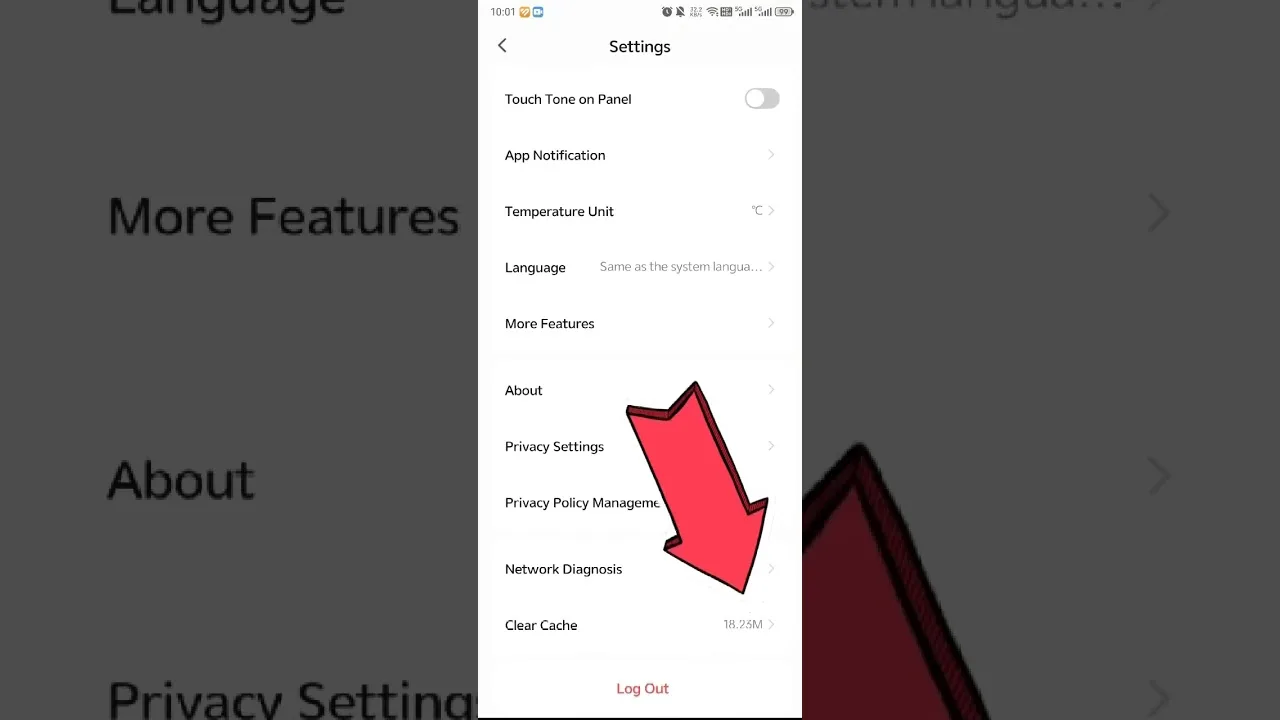
The cache clear is the safest real tool in Android maintenance, and in a management app it deserves its reassurance stated first and plainly: your router's settings live on the router, your device list lives with your account, and neither is in the cache. Clearing the AI Life home app cache removes temporary working files only — thumbnails, interface assets, fragments of lists — and this guide explains the steps, the glitches it genuinely cures, and the boundary against the heavier clear-data option.
If the app has developed odd, specific behaviour — a device list that will not refresh, stale artwork, a haunting that followed an update — this is very likely your page.
The operation takes a minute, and its worst outcome is a first launch that repopulates its lists a breath more slowly than usual.
What the Cache Holds Here
Interface furniture: device icons and artwork, recently rendered pages, list fragments kept so revisiting a screen feels instant, and other temporary scaffolding. It is the app's short-term memory of where things are displayed — not the record of what your network is.
Corruption or staleness in that layer produces oddly specific symptoms: the router page showing yesterday's state, a new device invisible in a list that otherwise works, artwork mismatched to devices. Those are the cache's fingerprints, and they are what this operation exists to wipe.
The Steps on Android
Open Settings, then Apps, find the app, open Storage and cache, and tap Clear cache. Reopen the app and let it rebuild: device lists and artwork repopulate as the app re-reads your household, which is the cache refilling with fresh, true copies.
Verify once, the first time, that you are signed in and your router and devices all appear. They will — nothing you value was in the cleared layer — and that verification makes every future clear a calm minute instead of a worry.
Glitches Clearing Genuinely Fixes
Stale device lists, artwork mismatches, pages stuck in an old state, and the post-update weirdness that comes from new code reading old temporary files — cache-shaped symptoms, all cured by the same one-minute sweep.
The update pairing is worth making a reflex: after a major app update, one clear prevents the commonest version of the app's strange week. The update routine itself is set out in how to update AI Life, and this page is its natural second half.
Cache Versus Data: The Boundary
Clear data resets the app to first-run condition: sign-in, preferences, and local state go with it. It has a legitimate late place in serious troubleshooting and no place as an opening move, because it spends real setup to chase problems that were never in the data layer.
Order attempts by cost: cache, then the standard fault sequence, then data with your settings recorded and your eyes open. Stopping at the first step that works is the definition of competent maintenance, here as everywhere. The full sequence lives in AI Life not working: common fixes.
What Clearing Will Not Fix
It will not make an invisible device discoverable when permissions or bands are the cause, repair the router, cure a provider outage, or fix a forgotten password. Those live in other layers with their own guides in this library, and clearing at them only delays the real remedy.
It will not reclaim lasting storage either; the cache refills by design. Chronic storage pressure is a phone-level conversation about downloads and media, not an app-cache ritual.
How Often, and Alongside What
Clear on symptoms and after major updates, not on a calendar. A healthy cache is why the app opens instantly to your household, and weekly sweeping out of tidiness taxes exactly the responsiveness it claims to protect.
Pair the occasional clear with the maintenance that protects irreplaceable things: settings logged, credentials stored, the device register reviewed. The cache holds nothing irreplaceable, and that is precisely its charm.
If the Glitch Survives
A symptom that returns immediately after a clear is telling you its layer is deeper — permissions, discovery, account, router, or provider. Believe it, graduate to the relevant guide, and record what you tried in the fault log.
Three lines per incident is the whole ask. Logs turn stubborn faults from hauntings into case files, and case files get solved.
One minute, nothing you value at risk, a specific family of glitches genuinely cured: the cache clear kept in its role is the model citizen of maintenance operations.
Verify once that your household survived — it will, because it was never in the cache — and file the operation under boring and useful, where most good maintenance lives.
Leave the steps bookmarked where your thumb can find them on a flustered evening. The cache clear is needed precisely when patience for hunting through settings is shortest, and preparation is kindness to the future self who will be standing in the hallway at midnight.
Small tool, specific job, zero risk. Kept in that role, the cache clear will never waste your worry, and the glitches in its family will never survive their first evening.
Bookmark the steps if your memory prefers paper to recall. The operation is rare enough that re-reading thirty seconds of instructions beats memorising them, every single time it comes around once again.