How to Check and Improve Wi-Fi Signal With AI Life
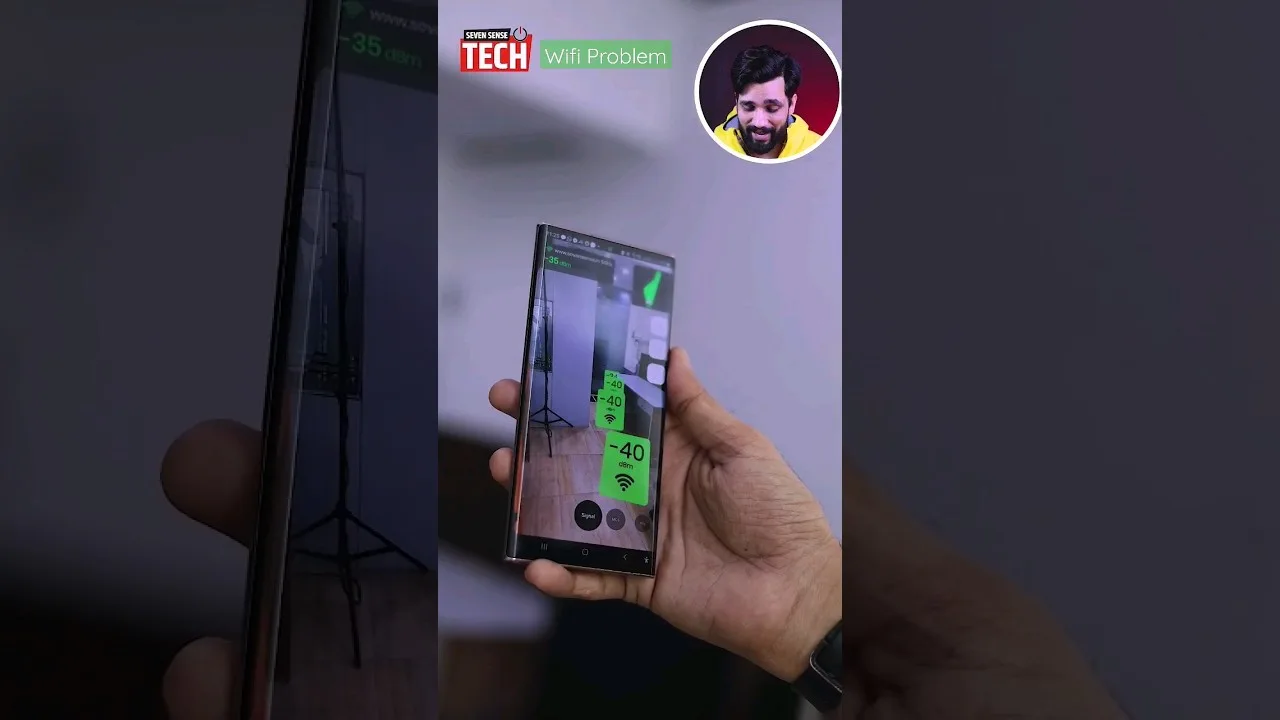
Every home has the chair where video calls go to die. Wi-Fi weakness is usually not a mystery of bandwidth but of geography — walls, distance, interference — and geography can be measured. the AI Life application puts signal information in your hand so you can walk the home, find the truth room by room, and fix causes in the right order: placement, interference, settings, and only then purchases.
This guide teaches the survey method, how to read what the numbers mean for real activities, and the fix ladder from free to bought. Bring your phone and fifteen minutes; leave your assumptions at the door, because the dead zone is rarely where the household blames it.
By the end, 'the Wi-Fi is bad' will have been replaced by a sentence with a room and a cause in it — which is most of the way to fixed.
Survey the Home Room by Room
Walk slowly with the app's signal view open, pausing where people actually use the internet: the desk, the sofa's far end, the bedroom corner where calls happen from bed. Note the strength in each spot, or simply rank the rooms from strongest to weakest as you go.
Test at the hours that matter as well as the hour that is convenient. Evening congestion and a neighbour's identical channel are facts that only appear on duty, and a survey done at dawn will acquit a network that fails nightly.
What the Numbers Mean for Real Life
Translate strength into activities rather than worshipping the digits: strong signal carries anything; middling carries browsing and standard video but resents large downloads and competitive games; weak carries messaging and regret. Your household's activities, mapped onto your rooms, tell you which weaknesses are problems and which are trivia.
A weak signal in the guest room's far corner may matter never. The same weakness at the home-office desk matters daily. Fix in the order of consequence, not of measurement.
Placement: The Free Fix With the Biggest Effect
Move the router before spending anything: central beats corner, elevated beats floor, open air beats cupboard, and every wall between router and desk is a tax. Even two metres of relocation, or a rotation out of a tangle of cables and metal, regularly transforms the worst room in the house.
Re-survey after each move, from the same spots, and keep the placement that serves the important rooms best. This is an experiment with a method, not a superstition with a router. The baseline habit began in setting up and managing your router with AI Life; this page is its fieldwork.
Interference and Channels
Neighbours' networks, and household electronics, crowd the airwaves — worst in apartment blocks on the older band. Where the router offers channel selection or automatic optimisation, let it work overnight and re-survey; a clearer channel is free coverage that many homes never collect.
Keep the router away from the worst local offenders — microwave ovens, thick masonry around old chimneys, large metal appliances — and prefer the less crowded band for the devices that support it, where distance allows.
When Mesh Is the Honest Answer
Some homes defeat any single box: long, thick-walled, multi-floor. There, supported mesh nodes extend one network under one name, placed where signal is still decent so they have something to relay. The app manages them as one system, which keeps the household's architecture comprehensible.
Buy mesh for geography, not for speed promises. Your survey is the evidence: rooms that stay weak after placement and channel work are the rooms mesh exists for, and no others need it. The diagnostics view in AI Life network diagnostics and troubleshooting tools will confirm the improvement afterwards in the only terms that matter — the same rooms, re-measured.
Device-Side Truths
Sometimes the weakling is one device, not the network: an old laptop whose Wi-Fi predates the router's manners, a phone with a failing radio, a console behind a metal cabinet. Compare two devices in the same chair before redesigning the house around one of them.
Where one device must live in a weak spot permanently, a wired connection — where practical — remains the undefeated answer: unfashionable, invisible, and absolutely unbothered by walls.
Keep the Survey
Save your room rankings with the seasonal routine. Networks drift as furniture moves, neighbours upgrade, and new devices arrive; last year's survey is this year's baseline, and the comparison is how slow degradations get caught while they are still small.
Teach the household the important rooms' expectations. A family that knows the desk is strong and the garden is hopeful complains more precisely, and precise complaints are halfway to fixes.
Measure first, move the box second, clear the air third, buy mesh only where geography demands it. That ladder fixes the overwhelming majority of 'bad Wi-Fi' without a single purchase, and justifies the purchase completely when one is needed.
The chair where calls go to die has a cause. Now you own the instrument that finds it.
Share the survey results with the household in plain language — the desk is strong, the garden is hopeful — because expectations set honestly produce better complaints, and better complaints produce faster fixes. Half of network folklore is just unmeasured disappointment repeating itself.
Re-survey after any big furniture move or renovation, not only after purchases. Rooms change their radio character when bookcases migrate, and last year's strong corner can become this year's mystery without a single setting being touched.